
RainDrop: Virtual Rain Gauge
RainDropGaugeWeather
4.3587.00 Reviews
- Version
- 3.1.85
- Installs
- 100.00K
- Age Rating
- Everyone
Screenshots
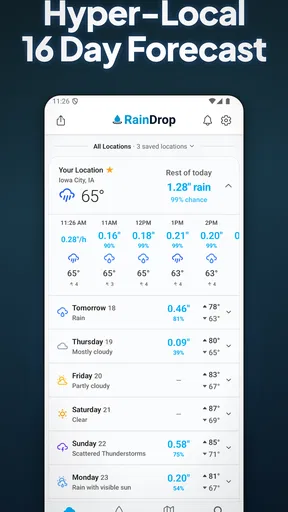
Our Review of RainDrop: Virtual Rain Gauge
 Analysis by Appyee
I find a rainfall tracker most useful when I treat it as a record to consult, not a substitute for looking out the window or checking a full forecast. That distinction matters with RainDrop: Virtual Rain Gauge: its appeal is the chance to follow rain totals close to home and notice how they change, rather than to answer every weather question from one screen. If you garden, keep an eye on a soggy path, or simply wonder whether a passing shower amounted to much, that narrower purpose can be genuinely handy.
A steady routine makes the numbers more useful
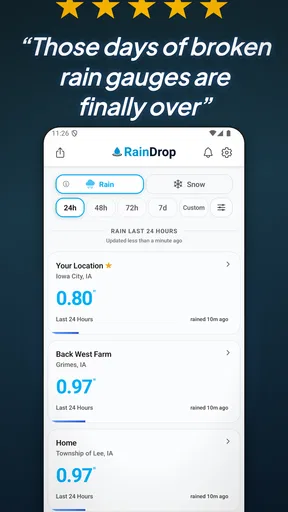
My practical approach is to check the app at a consistent point in the day, then compare the current reading with the recent history instead of reacting to each glance. A single total can be hard to interpret on its own; a series of readings gives it context. For a gardener, that can help make a watering decision more thoughtful, though I would still check the soil itself before deciding a plant has had enough. Rainfall recorded for a location cannot tell you whether a sheltered pot or a patch under a tree received the same amount.
That location issue is worth remembering around a house. A forecast or tracker tied to your phone’s position may be a useful local reference, but it is not the same as a physical gauge placed beside a vegetable bed. I would use RainDrop to follow the broader pattern and a simple outdoor gauge when a precise reading at one particular spot is important. This is a small distinction, but it prevents the app’s convenience from turning into false certainty.
Choose the right tool for the question
Most general weather apps are built around forecasts, temperatures, and a quick answer to “Will I need a coat?” A dedicated rainfall tracker has a different job: helping you pay attention to accumulated rain and compare periods. I like that focus for curiosity and routine planning, but I would reach for a conventional forecast when timing matters, such as deciding whether to leave for a walk before a storm. The two approaches can complement each other; neither replaces the other.
For someone managing a garden, the most useful habit is to pair the rain history with what is happening on the ground. If the app shows a wet spell but your containers are under an awning, they may still need water. If you are checking drainage, compare the rainfall trend with what you see around the property after rain rather than assuming a number explains a puddle. These checks make the app a better decision aid without asking it to measure conditions it cannot observe directly.
Know what you are installing
RainDrop is a free weather app from RainDropGauge, with in-app purchases listed from $2.99 to $149.99 per item. Its average rating is 3.3 from around 1.7 thousand ratings, and it has over 100 thousand installs. I would take that middling rating as a reason to keep expectations measured: the focused idea may suit people who want rain totals, but it is not a guarantee that every user will find the experience smooth or useful for their location. It is rated for Everyone, and the current version is 3.0.10.
It first appeared on June 4, 2024, and the listed minimum Android version is 7.0. Those details make it easier to judge basic compatibility, but I would still check the app’s current store page on the device I plan to use, especially if I rely on a particular Android setup. I would also look carefully at any purchase screen before confirming anything. The app costs nothing to install, while optional purchases can be substantial, so it is sensible to explore the free experience first and decide whether any paid option answers a need you actually have.
Who will get the most from it
I think the best fit is someone who has a recurring reason to monitor rain: a gardener comparing wet and dry stretches, a homeowner watching a drainage problem, or a weather-minded person who enjoys keeping a local record. It can also help someone plan low-stakes outdoor chores by adding rainfall context to a forecast. The key is to use it as one input rather than as a promise about exactly what is happening at every corner of a property.
I would skip it if all I wanted was a quick forecast, severe-weather guidance, or an answer about rain minute by minute. In those situations, a broader weather service designed around forecasts and alerts is the more direct choice. I would also avoid relying on a virtual reading for irrigation decisions where a wrong call could harm valuable plants; checking soil moisture or using a physical gauge gives you a closer view of the actual spot.
First Impressions
Right off the bat, the RainDrop: Virtual Rain Gauge app impresses with its sleek and intuitive interface. The setup is a breeze, requiring just a few taps to get your location set up. I was pleasantly surprised at how quickly the app was ready to go, without any of the tedious sign-up processes that some other apps demand.
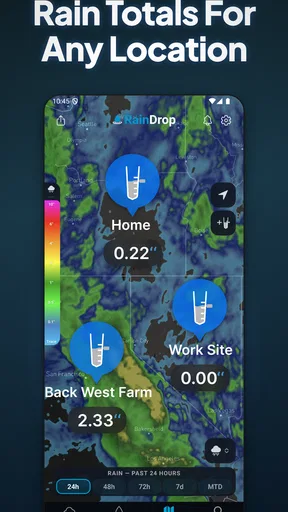
The home screen is clean and straightforward. You're greeted with a real-time display of rainfall in your exact location, thanks to its precise GPS tracking. It’s like having a tiny meteorologist in your pocket, minus the fancy degree.
Features That Stand Out
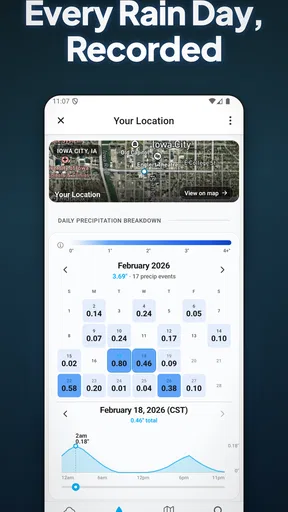
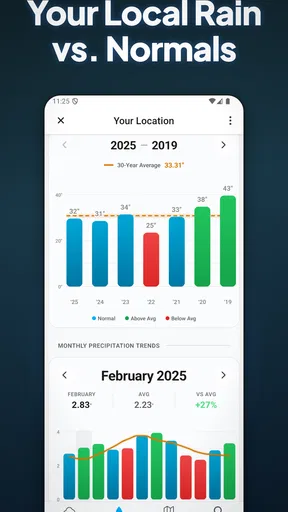
One of the coolest features of RainDrop is its ability to track historical rainfall data. You can easily look back at how much rain has fallen over the past week, month, or even year. This not only satisfies your curiosity but also helps if you’re a gardener or farmer who needs to keep tabs on moisture levels.
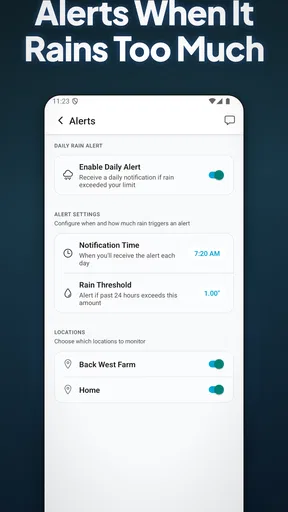
Another handy feature is the rainfall alert system. You can set the app to notify you when a certain amount of rain has fallen. This is especially useful if you’re planning outdoor activities or need to manage drainage around your property. I’ve found this feature to be particularly valuable on those days when it seems like it might rain forever.
User Experience
Using RainDrop feels like having a personalized weather station. The app is light on system resources, meaning it doesn’t drain your battery or hog all the data. It’s designed to run in the background quietly, popping in only when it has something important to report.
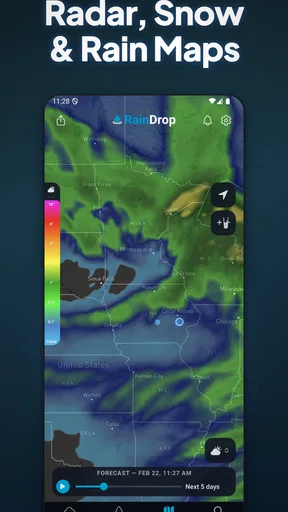
For those who love data, the app offers detailed graphs and charts. I found myself getting lost in the colorful visuals, comparing different days and weeks to see how rainfall varied. It’s both educational and oddly satisfying to see the patterns unfold in such a visually appealing way.
Community and Sharing
One feature that really surprised me is the ability to connect with other users in your area. There’s a community aspect where you can share your rainfall data, compare stats, and even engage in friendly competition to see who gets the most rain. It’s a fun way to connect with neighbors and share in the wonder of weather.
Plus, if you're one to share your life on social media, the app makes it easy to post updates on your local rainfall stats directly to your platforms. It’s a quirky way to engage with friends and share something a little different from the usual selfies and food pics.
Making the routine stick
For a realistic weekday use, imagine checking the rain history before watering after work. I would first look at the recent trend, then take a quick look at the garden: are the pots exposed, is the soil damp, and did a roof or tree shelter them? If those observations disagree with the app, I would trust the plants’ actual conditions. The useful payoff is not outsourcing the decision, but remembering to ask the right question before turning on the hose.
A similar routine works for a driveway or low spot that collects water. Check the record after a wet day, note whether the area drained as expected, and compare it with later rainy periods. That can help you describe a recurring issue more clearly or decide when to inspect it. It will not diagnose a blocked drain, but a repeatable log is more informative than relying on memory alone.
Settings and alerts worth approaching carefully
Because the app depends on a location and offers rainfall notifications, I would review both the location choice and alert threshold early, then leave them alone long enough to see whether they fit my routine. An alert that is too sensitive can become background noise; one set too high may arrive after the moment when it would have helped. I would choose a threshold based on a real task, such as checking a garden or watching a drainage area, rather than setting one simply because the option is there.
I would also consider how often I truly need to be notified. If I only check totals once a day, frequent prompts may add distraction without improving a decision. If I am watching a property during a particularly wet spell, alerts may be more worthwhile. The right setup depends on the reason for tracking, so a short trial followed by an adjustment is more sensible than assuming one setting works for everyone.
Reading charts without overreading them
The graphs are most valuable when I compare like with like: one week against another, or a recent stretch against a longer period. That keeps a brief shower from seeming more significant than it is. I would treat the visual trend as a prompt to investigate, not proof that every part of my yard received identical rain. Location, shelter, and ground conditions all affect what a rainfall total means in practice.
This is also where a simple personal note can add value. If a particular bed stays dry or a path floods, remember that alongside the app’s history. Over time, the combination of a consistent record and a quick observation can reveal a useful pattern. It is a low-effort workflow, but it is more dependable than trying to infer everything from a colorful chart at a glance.
Where convenience has limits
A virtual gauge is not a physical instrument sitting beside the plants or drain you care about. That makes the app convenient for broad local tracking, but less suited to anyone who needs a precise measurement at a specific point. If you are planning irrigation for a valuable garden, doing formal observations, or making decisions where small local differences matter, a physical gauge and direct inspection are the safer tools.
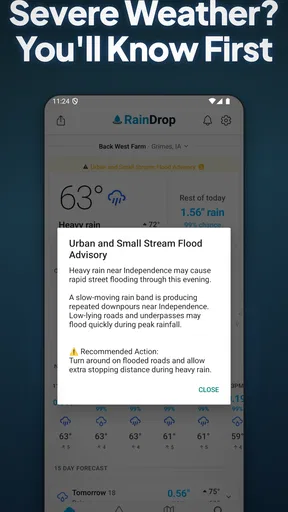
I would also keep a separate source for forecasts and urgent weather information. Rain totals tell a different story from what is expected next, and an accumulated reading is not a substitute for a warning or a forecast timeline. For a walk, a commute, or an outdoor event, I would consult a forecast first and use RainDrop as added context about what has already fallen.
Final Thoughts
Overall, the RainDrop: Virtual Rain Gauge app is a delightful addition to anyone's smartphone. It’s practical, easy to use, and packed with features that make tracking rainfall not only informative but also fun. Whether you’re a weather enthusiast, a gardener, or just someone who wants to know if they should carry an umbrella, this app has you covered.
So, if you're looking for a way to track the weather in a more personal way, give RainDrop a try. It's like having your own personal rain gauge right in your pocket. You can thank me later when you're the only dry one in a surprise downpour!
My verdict on using it well
I would recommend RainDrop to someone who enjoys local rainfall records and is willing to pair them with ordinary observation. Its strongest use is the repeatable habit: check the history, consider what the reading means for your own space, and use alerts only when they serve a clear purpose. That makes the app more helpful than an occasional novelty, especially for people who already think about garden watering or drainage.
Privacy and Permissions
See what permissions an app requests and how it handles your data.
- Location
- approximate location (network-based), precise location (GPS and network-based)
- Photos/Media/Files
- read the contents of your USB storage, modify or delete the contents of your USB storage
- Storage
- read the contents of your USB storage, modify or delete the contents of your USB storage
- Wi-Fi connection information
- view Wi-Fi connections
- Other
- view network connections, full network access, run at startup, draw over other apps, control vibration, prevent device from sleeping, read Google service configuration
Verdict
Strengths of RainDrop: Virtual Rain Gauge
- Accurate real-time rain data.
- User-friendly interface design.
- Customizable alerts for rain levels.
- Integrates with smart home devices.
- Low battery consumption on phones.
Limitations of RainDrop: Virtual Rain Gauge
- Limited offline functionality.
- Requires location permissions.
- Ads in free version can be distracting.
- Some features locked behind paywall.
- Occasional data syncing delays.
Similar Picks in This Category
View All
Weather - By Xiaomi
Xiaomi Inc.4.1

Weather & Radar Forecast
WetterOnline4.8

Weather
OneLouder Apps4.6

AccuWeather: Weather Radar
AccuWeather3.6

The Weather Channel - Radar
The Weather Channel4.6

1Weather Forecasts & Radar
OneLouder Apps4.3
Frequently Asked Questions
What is RainDrop: Virtual Rain Gauge and how does it work?
RainDrop: Virtual Rain Gauge is an innovative app that allows users to track rainfall data from their mobile device. By utilizing local weather data and your device's location services, the app provides accurate rainfall measurements in your area. It’s perfect for gardeners, farmers, or anyone interested in weather patterns.
Is RainDrop: Virtual Rain Gauge available for both Android and iOS devices?
Yes, RainDrop: Virtual Rain Gauge is available for download on both Android and iOS platforms. You can find the app on the Google Play Store for Android devices and the Apple App Store for iOS users. Ensure your device meets the app’s system requirements for optimal performance.
Does RainDrop: Virtual Rain Gauge require an internet connection to function?
RainDrop: Virtual Rain Gauge requires an internet connection to access the most current weather data. While some features may work offline, such as viewing previously downloaded data, a stable connection is needed for real-time updates and accurate rainfall measurements.
How user-friendly is the RainDrop: Virtual Rain Gauge interface?
The app is designed with user-friendliness in mind, featuring a clean and intuitive interface. Users can easily navigate through various sections like rainfall history, alerts, and settings. Customizable notifications ensure you receive updates on rainfall changes without unnecessary hassle.
Are there any additional costs or in-app purchases in RainDrop: Virtual Rain Gauge?
RainDrop: Virtual Rain Gauge is free to download, but it offers optional in-app purchases. These can include premium features such as advanced data analytics, ad removal, and enhanced notification settings. Users can enjoy the basic features without any cost, while premium options provide an enhanced experience.
